v1.3.0 – “We’re All 🎉Partycles After All”
⚠️ Warning: Original Unity Editor Version of Outline System Pro 📦Package Updated
Up until this version the Outline System Unity Editor version used for development was 6000.2.8 but has now been updated to 6000.3.20f1 LTS.
The plan is to try to stay always at least a couple of versions behind on the latest Unity Editor releases, to make the system more compatible with older Unity Editor versions, but the previous Editor version had I quote: “An issue has been identified with this Editor version where packages with valid signatures are incorrectly marked as invalid.” so it was recommended by Unity to Update to a newer release and 6000.3.20f1 seemed like a nice round number!
If the Editor version that you’re using is older than 6000.3.20f1 LTS then Unity might give you a warning about it on package import but I haven’t noticed any changes between updates so I’m hoping that won’t cause any problems, feel free to let us know otherwise.
❗Breaking Changes: JFA DF 🔭View-Space 🔳OutlineThickness Units Change
The 🔳OutlineThickness of the ⭐Pro 🖼️Composite ⭕Silhouette 🌊JFA UV Distance Field Default shader and the ⭐Pro 🖼️Composite ⭕Silhouette 🌊JFA UV Distance Field Depth Tested shader now use a thickness in ‘centimeters’ (1/100) instead of full units, which makes it a little bit easier to control them and it makes the difference on screen between the thickness in Screen-Space which is in (pixel units) and in View-Space smaller, so easier to toggle between the two.
If you’re using one of the shaders in your project then you may have to divide your View-Space 🔳OutlineThickness by a hundredth (or multiply it with a hundred).
➕Summary of the most important changes:
✨ (🌋Highly Experimental!) 🎉Particle System Renderer Support
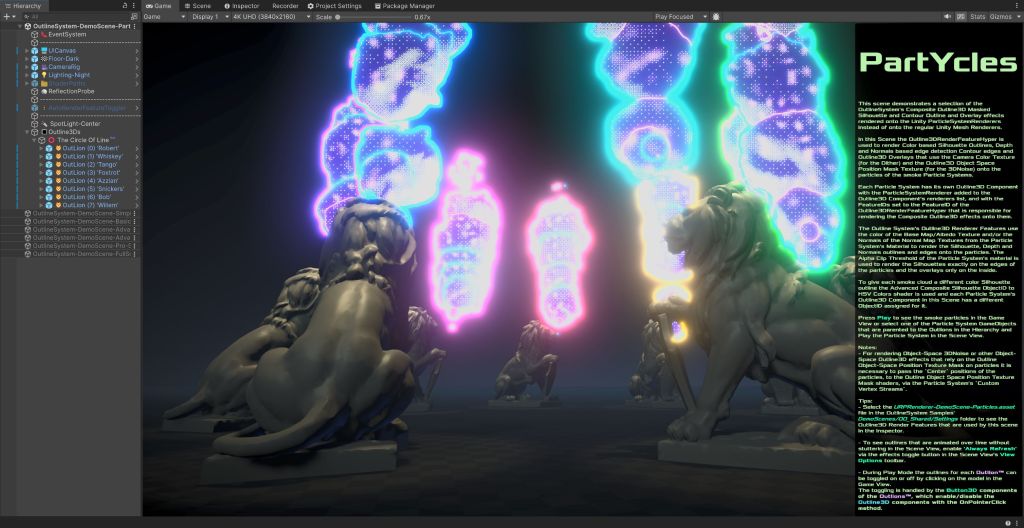
A lot has changed since the last update of the outline system and since the initial release, so I thought this would be an appropriate time to start with writing blog-post style summaries of the changes made since the last update, and of the new features added to the system. Up to now the system only supported the rendering of (masked) outlines and overlays onto regular Mesh Renderers and Skinned Mesh Renderers but with version 1.3.0 comes (experimental) support for Particle System Renderers.
To get the system ‘particles ready’ a couple of changes had to be made to the 🔳Outline3D 🎭Mask shaders to be able to write the particles into the masks, so the default Color, Depth and Normals etcetera masks all have had some new ⚠️Internal properties and node setups added to them and are all updated to a newer version. Right now the system supports binary ⭕Silhouette outlines, edge detection 🌐Contour edges and 🔲Overlays onto particles rendered with the default URP Lit, Simple Lit and Unlit Particle Shaders and it probably works best when the particle material is set to be Opaque with Alpha Clipping enabled so that there are clear binary edges to the particles, and with Flip-Book Blending enabled for animated texture sheet particles like smoke and clouds etcetera.
To render Depth and Color based outlines onto the particles, the Particle System’s material has to have at least a regular Albedo/BaseMap texture applied to it and to render Normals based edges onto them the particle material also has to have a Normals/BumpMap texture. Tip: You can duplicate any regular color texture in your project and let Unity create a Normal map from it by setting the Texture Type to Normal map and enabling Create From Grayscale in the texture’s Import Settings. To get the least noisy results it is best to make the normals very smooth, so with a Bumpiness of ~0.03 and with Filtering > Smooth.
If you want to use the 🟧Object-Space Positions for particles (for instance to use one of the 3DNoise type Overlays with Object-Space noise) then the Particle System has to have the particles Center positions added to the Particle System > Renderer > Custom Vertex Streams which will then pass the individual particles centers to the Outline ObjSpace Position Mask Material shader. (Without passing the particles Centers to the shader, the particles Object-Space will be in the space of the whole Particle System object and not of the individual particles)
A new Particles DemoScene is added to the package that shows of the new feature!
Some changes had to be made to the 🧑🎨Outline3DRenderFeatures as well in order to support Particle System Renderers so all the Renderer Features are updated to a new version as well.
🐞👁️ Debug Previewing 🌊JFA UV Distance Field Contours Edge Seeds Masks
To make it easier to control, adjust and fine-tune the Jump Flood Algorithm Distance Field Contour outlines it helps to be able to preview the contour edge shaped Outside JFA UV Seeds Mask from which the final Distance Field contour outlines are generated by the Composite JFA UV Contour shaders, so a 🐞DebugViewSeedsMask property was added to the Composite JFA UV DF Contour shaders, for viewing the masked pixels of the JFA UV Seeds Mask Outside mask shader. Enabling the 🐞DebugViewSeedsMask bool on the Pro-Cmp-Cntr-JFA-UVDistanceField-Default.shadergraph and on the other JFA UV DF Contour shaders will let the shader output/pipe-trough the masked UV Seed pixels directly to the camera, (in binary black on white instead of the red and green UV seed colors), so it will be easier to see the edges from which the Composite DF Contour shaders generate the distance field outlines in the Game and or Scene View.
💠 New Bayer Dither Matrix Size Options and Options for Grayscale or RGBA DitherSources
The 🎦FullScreen 💠Dither ☕Filter and the 🔳Outline3D 🔲Overlay 💠Dither shaders both have a new 💠#DitherMatrix mode Enum property that lets you choose between the default 4×4 Bayer Matrix and new 2×2 and 8×8 size Bayer Matrices. The 2×2 creates a very ‘rough’ Dither pattern transition with only 4 shades of dither and the 8×8 Bayer Matrix can create a very smooth Dither pattern transition with 64 shades of Dither for very fine control. Optionally the difference between the 4×4 and 8×8 Matrix are minimal, (the pattern stays the same), but you’ll find that the 8×8 size is a lot more sensitive to small differences in color or brightness which makes it easier to adjust overall and maybe better to use on non 🪇Posterized images where color transitions are smooth than the 4×4 size matrix.
Both the 🎦FullScreen and 🔲Overlay Dither shaders also have a new 💠⛲DitherSource mode property for choosing between the default RGBA Color Dither as the source or for a new 🩶Grayscale Dither source which converts the RGB Colors into a single Luminosity value first. The Dither Shaders also have a new 💠🪜DitherThresholdAlpha property for separately controlling where the Dithering of the Opacity starts. (To use the effect of this at least one of the two Dither colors needs to be transparent).
📺 New 3DNoise Type
A new type of 🧫Cellular3D 3DNoise is added to the 🎦FullScreen ☕Filter 3DNoise and to the 🔳Outline3D 🔲Overlay 3DNoise shaders. Cellular3D noise is basically the same type of noise as the 2D Voronoi noise type so it creates a dotted type of noise that can have the ‘feature points’ centered in the cells of a 3D grid or offset from their centers with random angles. Because it is a 3D noise which uses the World- or Object-Space positions to sample the noise, it can create a really cool surface-stable type of Halftone dotted pattern across geometry in the Scene especially when using it in combination with a Posterize filter!
⚫ New Halftone option for diagonal Halftone dot patterns
Both the ⭐Simple 🖼️Composite 🎦FullScreen ☕Filter ⚫Halftone shader and the ⭐Simple 🖼️Composite 🔲Overlay ⚫Halftone shader have a new ⚫🫸HalftoneOddRowOffset property which can be used to offset half of the rows to the left or right which can create diagonal dot patterns instead of a straight grid of dots which can just be a little bit more interesting to look at visually.
New ⭐⭐Basic 🎦FullScreen 🟦Normals Edge and ⬛Depth Edge shaders
Two new `⭐⭐Basic` `🖼️Composite` `🎦FullScreen` 🟦Normals Edge and ⬛Depth Edge shaders are added to the family!
The Normals shader performs ‘Basic’ edge detection on the Scene’s View-Space Normals and the Depth shader on the Scene Depth buffer. Basic because these shaders don’t use any Kernel weights like the Advanced edge detection shaders so they’re light and fast, but they add another new feature, that will probably be ported over to the other edge detection shaders as well later, on which is a Min-Max draw distance mask that can be used to only draw the Outlines between set start and end distances to exclude for instance the Skybox from being drawn on, or the other way around, to only draw the edges onto the Skybox or further in the distance. Another way that this effect can be used is to for instance draw multiple edges at different start/end distances, to draw extra thick outlines in the front area and thinner in the back, etcetera.
That’s the most of it! (but not all)
These were the most important changes for this round of applause!👏👏👏
You can find the full list of little big small changes made for the v1.3.0 update in the 🔳Outline System ✒️Documentation 📝Changelog.
There are still a lot of details that need to be further worked out, but all-in-all the system is starting to look more-and-more as the original vision I had for it when I started its development so that’s good! And I must say that I’m having an incredibly fun time making my programmer art with it while working on it so I hope you’ll have a fun time using it too!
🍻Cheers and until next time!⌛
Tim-∑

